
Download
Download the drivers and software necessary for your equipment.
Drivers
Windows: Camera connection
Connect natively
Some imaging software, such as N.I.N.A. and APT, will automatically recognize OGMA cameras without the need for a driver installation.
If you have software that supports the camera natively, select the camera listed under OGMA. Don't select the camera under ASCOM.
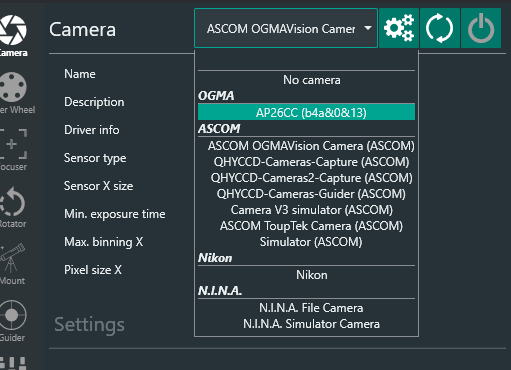
If you use Windows software that doesn't integrate natively with our cameras, download the corresponding ASCOM driver below.
Windows: Accessories (filter wheels, focusers & mounts)
Note: You may have to use ASCOM if your software doesn't recognize our cameras natively.
ASCOM Platform
Important: Before you can use an ASCOM driver, regardless of the manufacturer, the ASCOM platform must be installed first. If you are already using ASCOM drivers from other manufacturers, your computer already has the ASCOM platform installed.
After installing the platform, you need to choose a driver below.
We have two ASCOM drivers:
ASCOM driver for OGMA equipment released before 2026 (Ver 6.5.26247 - August 06, 2024).
ASCOM driver for OpenOGMA Filter Wheels released in 2026 (Ver 1.0.1 - September 28, 2025)
INDI Platform (MacOS and Linux)
For more details, see below, and refer to the manual for information on a known issue related to adding the AP08CC camera to INDI.
INDIGO Platform (Windows, Mac, Linux)
Learn more about INDIGO at https://www.indigo-astronomy.org/software.html and https://www.cloudmakers.eu/xindigo.
Firmware Updates
Cameras AP08CC
To ensure you always experience the best, we recommend consulting the AP08CC firmware update guide.
Cameras GP678C and GP678M
Please refer to the GP678 firmware update guide to determine if your camera requires this update and to learn how to apply it.
Filter Wheels
Please visit the filter wheel support page for files and instructions.
Software
Software that has been tested with OGMA (in alphabetical order)
APT - Astro Photography Tool
APT, or "AstroPhotography Tool," is a versatile software for astro imaging, supporting a wide range of cameras and devices since 2009, developed with insights from global astro photographers, compatible with MS Windows Vista through Windows 11.
Astroberry
A Raspberry Pi image that contains a suite of pre-installed programs to manage your astrophotography equipment and imaging sequences
AstroDMx Capture
Nicola Amanda Mackin developed a cross-platform astronomical image capture application on Fedora Linux. Nicola ported AstroDMx to the Raspberry Pi OS (32 and 64-bit), macOS, Windows 10/11, and ChromeOS running under the Crostini virtual environment.
Astroimager
A front end for imaging and auxiliary devices INDIGO agents. Its purpose is to control the primary imaging camera, filter wheel, and focuser to allow proper framing, focusing, and capturing from a single batch of images to a complicated series of images with different parameters and settings.
INDI
A complete ecosystem for control and automation of astronomical devices generally used with LINUX and MAC operative systems. It includes software like KSTARS and EKOS
Firecapture
A suite of planetary capture tools
N.I.N.A
A software to automate the process of taking images of deep sky objects such as nebula and galaxies using a sequencing model
PHD2
Telescope guiding software that simplifies the process of tracking a guide star. It can be used in combination with other sequencing software, such as N.I.N.A.
SharpCap
Software for astro imaging including Planetary, Lunar, Solar, Deep Sky, and EAA (Electronically Assisted Astronomy)
Did we miss anything?
If you know of an astronomy imaging software that cannot connect to OGMA, to if you are the developer of an astronomy software and want to integrate the OGMA cameras into your software, please let us know.